
Publishing Audio and Video Files on the KIT Library Media Portal
General Questions About the Media Portal
Most of these are contributions related to KIT institutions. In addition to lecture recordings, these may include in-house reports on KIT institutions, projects, and courses, as well as instructional videos. It also includes radio and television segments that were recorded as part of courses or that cover KIT.
The media portal is a sub-catalog of KITopen. All media contained in the media portal are also listed in KITopen.
The most recently published media files are displayed on the home page. To the left of the displayed media, you’ll find filters that allow you to narrow down the search results. You can enter search terms in the search bar.
When you type keywords into the search bar, a list of suggestions for similar terms found in the media portal is automatically displayed. By enclosing your search terms in quotation marks, you can perform a string search to find exact word sequences.
By checking the corresponding checkbox, you can also search within the content of the media files. If the term you’re looking for appears in the content, you can use the displayed link to go to the exact location in the article.
Yes. With the exception of radio and television recordings, automatically generated subtitles in the respective language are available for all audio and video files. Since mid-2024, English subtitles have also been displayed for newly added German-language content.
If needed, you can also send us subtitles you’ve created yourself in the form of a vtt, srt, or sbv file.
It depends. Media files with global access can always be downloaded. For files with campus-wide access, the person entering the information can decide whether or not the media file should be made available for download.
If the download option is enabled, a download arrow will appear in the full view under the “Technische Informationen / Andere Formate” tab. If no download arrow is visible, the download option was not enabled when the entry was created in KITopen.
All audio and video files available in the media portal are automatically provided with an embed code in various resolutions, which you can use to embed them in websites. With this code, the media file—including the original player—can be embedded in another website. In this case, all features—such as playback speed options and subtitles—will also work.
You can access the embed code in the media portal by going to the “Export” tab in the media file’s full-screen view:
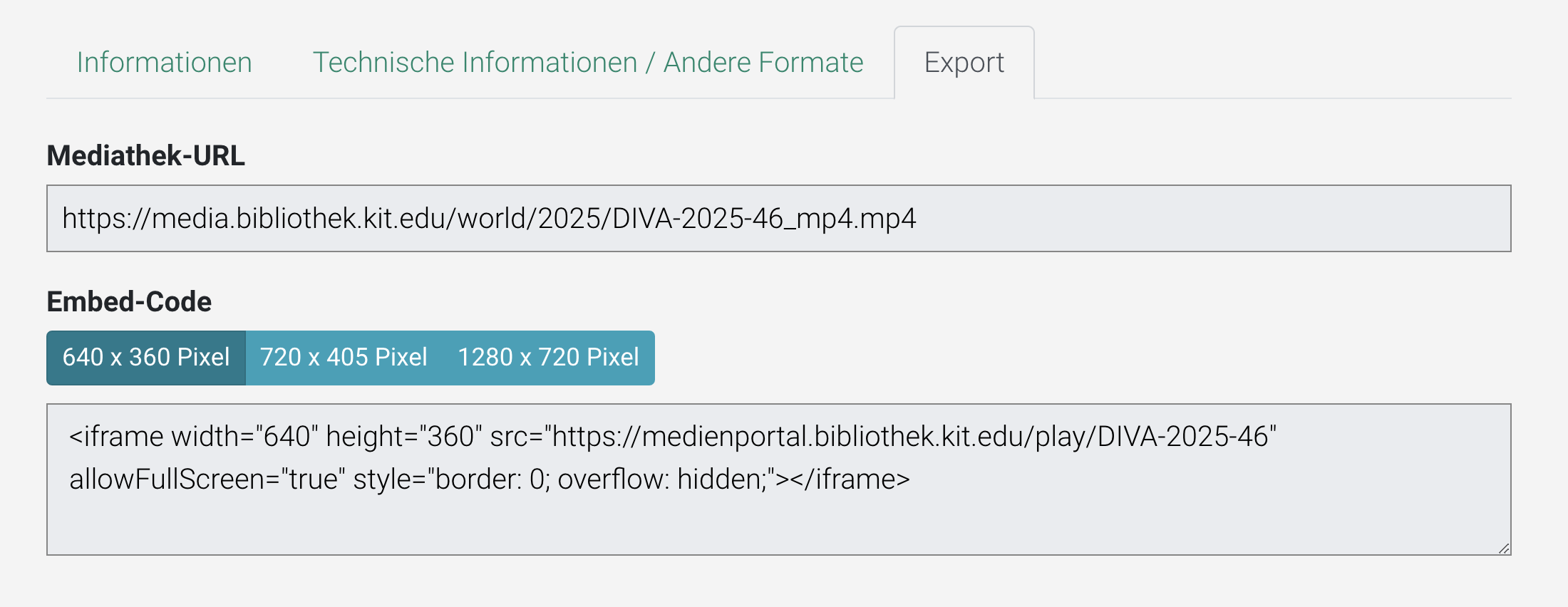
For audio and video files with global access, the media library URL is also displayed, which can be used to embed the content into a media library using OpenText, in the respective corporate design. In this case, the browser's built-in player is used for playback. This means that features of the original player—such as subtitles or playback speed controls—generally do not work. If these features are important, please use the embed code (see above) instead. The embed code and direct link will also be sent to you via email after your audio/video is published.
With the service KITopen publication lists your digital teaching materials will be automatically integrated into your KIT website.
See also the information under “How do I embed my media file on a website?”.
ILIAS does not support embedding via an embed code. However, you can embed your media file as a media object using the direct link (media library URL) instead. Or you can enhance your video using the H5P video player to create an interactive video with interactive content (e.g., quizzes or comments).
You can find detailed information on this on the ZML website under the heading "Bereitstellung und Nachnutzung", in the section "Nachnutzung eigener Aufzeichnungen".
Questions About Publishing on the Media Portal
You can publish audio and video files. The content should be related to KIT. In addition to lecture recordings, this can include self-produced reports on KIT institutions, projects, courses, or instructional videos.
As a KIT employee, you can also have radio and television segments recorded that you need for your course or research. For copyright reasons, these are only accessible at the Internet workstations at KIT Library.
The following file formats are supported for publishing on KITopen:
- Audio files: wav, mp3, m2a, ogg, pcm, wma
- Video files: mpg, mpeg, mp4, mov, flv, swf, avi, rm, m2t, m2v, m4v, f4v, mts, wmv, 3gp, webm, mkv
To publish, please use KITopen Depositing & Publishing. You can publish your audio and video files on campus or worldwide. For global distribution, you can license your media file under an open license.
If necessary, the availability of the media file can be limited to a specific time period. Media files with unlimited access are assigned a DOI, which can be used to cite them.
You can also embed your media files on your KIT website or in ILIAS using a link.
If your media file already exists in ILIAS as an OpenCast file, you can import it into KITopen. For more information, see “Can media files be imported from ILIAS into the media portal?”
You can add any co-authors using a form (Link to the German version | Link to the English version) to obtain permission to publish.
Yes, you can find such a form in German here and in English here. You can use this if you need permission to publish your media file from other people, such as co-authors, speakers at recorded courses, etc.
Yes, all OpenCast media files available in ILIAS can be administered using the OpenCast Recording Management (OC-AV) service and published via KITopen. You have two options for doing this:
Option 1: Via KITopen Depositing & Publishing:
- After logging in, select the "Import from ILIAS/OC-AV" button in the "KITopen teaching" box.
- You will see an overview of all media files assigned to you that have been fully processed.
- You can import and publish all media files that have not yet been deposited in KITopen to the repository by clicking the button of the same name.
- Media files that have already been deposited in KITopen are marked accordingly. You can access these via the link and correct the metadata if necessary.
Option 2: Via OC-AV:
- After logging in to OC-AV, click the "Fertige Aufzeichnungen verwalten" button. You will see an overview of all media assigned to you that have been fully processed.
- Open the desired record in full view and open the “Veröffentlichungskanäle” panel.
- Here, you can import and publish your media file to KITopen by clicking “KITopen Publikation verwalten”.
Even if you have only used your videos in ILIAS so far, you can publish your materials campus-wide or even worldwide via KITopen at any time, thereby significantly increasing the visibility of your teaching content and removing barriers to access. The metadata for your materials is always visible worldwide and indexed by search engines. All materials are assigned a persistent Digital Object Identifier (DOI), which you can cite in your bibliographies.
In addition, by publishing on KITopen, you can display your materials via the service KITopen publication lists on your own website or your institute’s website. Another advantage is that you can make your course or lecture permanently accessible via KITopen, whereas availability via ILIAS is limited in time.
For publication in KITopen, we recommend using an open license, so that it is available as Open Educational Resource (OER).
Yes. Before your media file goes live, you can generate a temporary “review link” that you can use to review the post. You can also share this link with others if needed. Your audio or video file will not be published until you complete the review.
You can choose whether you want to make your media file accessible worldwide or only on the KIT campus network. All permanently published media are assigned a DOI, even if their reach is limited to the campus network.
Yes, when entering metadata in KITopen data recording, you can specify a publication period or just a start or end date. You can adjust the time period at any time to individually control the availability of your media file.
A DOI is only assigned to media that is available indefinitely. In other words, only if no end date is entered when entering the metadata.
A preview image is automatically generated when the media file is transcoded. Currently, you cannot select the thumbnail yourself. However, you are welcome to send us an alternative thumbnail in JPG or PNG format via email.
When depositing media data in KITopen, you can choose between the following licenses:
- KITopen license (default)
- Creative Commons license
- Other (open) license
You may use materials protected under German copyright law (texts, graphics, images, illustrations, film clips, etc.) within the scope of the right to quote under Section 51 of the UrhG.
Please ensure that you always cite third-party materials correctly and follow the rules of good research practice. Further information on this can be found at the Office for Good Research Practice and Ethical Principles (Office GWP).
For more information on the use of third-party materials, please see the section on "Legal Issues" in our OpenCast Recording Management FAQ.
Yes, by publishing your work, you are simply granting us a permanent, non-exclusive right of use for electronic publication in KITopen, which means that other publication channels remain open to you. You retain the copyright.
Even if you have licensed your media file under a Creative Commons license, you retain the copyright, but you also grant additional rights for further use that extend beyond KITopen.
For more information on the use of open licenses, please see the section on "Legal Issues" in our OpenCast Recording Management FAQ.
To ensure the longevity and citability of our database, media files that have already been published are generally not deleted. Instead, an end date can be entered in the metadata under "Publication Period," so that the media file can no longer be played.