
OpenCast Recording Management (OC-AV)
The "OpenCast Recording Management (OC-AV)" service allows KIT faculty to plan, record, download, and make their courses available for reuse. This service is the result of a joint project between KIT Library, ZML, SCC, and ASERV.
Service
With OC-AV, you can enable automatic recording for a lecture and make it available in the ILIAS course with just a few clicks. New recordings within this lecture series are added automatically.
You can upload non-automated recordings (self-recordings) to the ILIAS course as usual and then perform administration of them in OC-AV. This gives you access to a wide range of features, such as optimizing video quality, generating embed codes, and easily sharing recordings with other distribution channels.
Workflow
The following chart provides an overview of the entire process:

Consultation and Support for Teachers
We recommend that you schedule a consultation in advance regarding digital teaching to ensure the best possible preparation and delivery of your course. The relevant stakeholders at KIT have coordinated a multi-stage e-learning package. We recommend that you take advantage of all aspects of the consultation services offered.
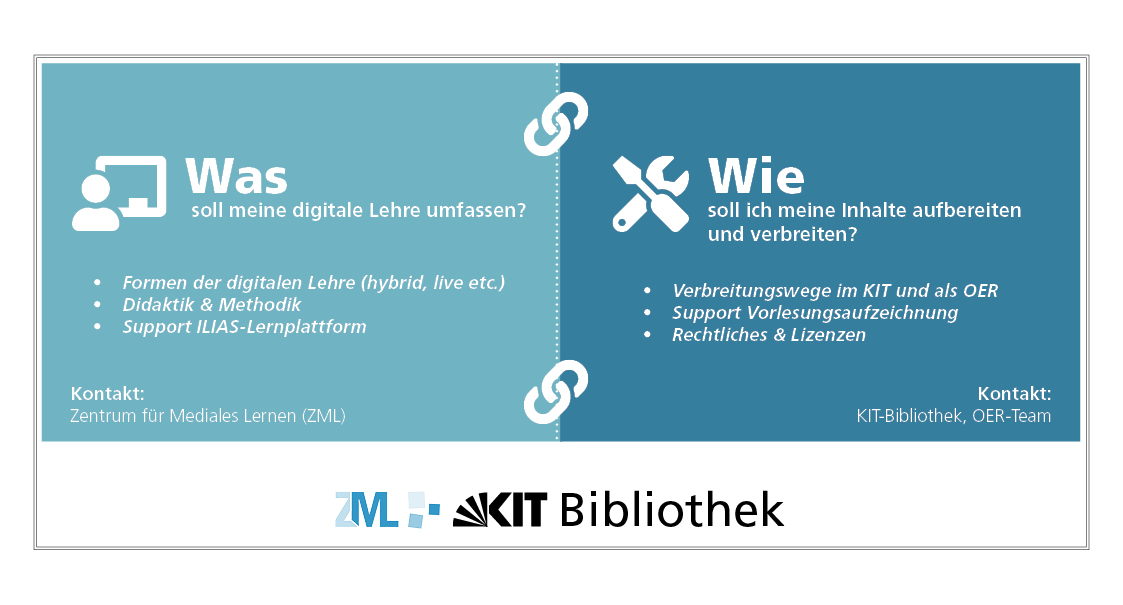
On the project pages of ZML you find:
- Instructions for easily integrating the videos into a current ILIAS course
- Examples and tips for using recordings—in whole or in part—in multiple courses of your own, or for enhancing them with interactive elements
- Information and instructions for creating professional self-recordings
The KITopen Repository team offers you:
- Support with issues related to automated recordings
- Information and advice on the applicable legal framework (What materials am I allowed to use? What copyright exceptions apply to my teaching?)
- Assistance with publication
FAQ on OC-AV and the Recording and Dissemination of Teaching Materials
General Questions on the Recording of Teaching Materials
The ILIAS platform offers OpenCast objects for embedding AV media (e.g., lecture recordings) in ILIAS courses.
KIT Library provides an OpenCast system in which the media is processed and stored. All media within an OpenCast object in ILIAS are represented as a series in OpenCast. The OpenCast recording administration system serves as a simplified front end for instructors to manage these series and media. Within the OpenCast object in ILIAS, you can use a permissions and roles system to determine whether course participants are able to view content from the series, download it, or even upload their own content to a linked series.
For more information, see here: ILIAS Recording Guide
Through the OpenCast Recording Management (OC-AV), recordings in the lecture hall can not only be scheduled but also administered and assigned to series. In addition, you can configure reuse options (such as assigning an embed link for Ilias or H5P, as well as use in KITopen) and grant other users permissions for media administration. The service is being gradually expanded and enhanced with additional features.
In all equipped lecture halls, the projector and microphone signals are recorded. In some of them, it is also possible to activate a permanently installed camera or to record a second projector signal (e.g., for the visualizer). The specific options available in each lecture hall are displayed individually in OC-AV upon activation.
This matter is your responsibility. You can either disable automatic recording for individual appointments or continue recording with the prior consent of the representative.
Each series always has exactly one owner. The owner can grant additional users editing access to the series in OC-AV. More information on this will follow.
The specific features and associated recording options are displayed in OC-AV as appropriate for each individual course.
In rooms where automated lecture recording is not set up or where there is a technical issue, self-recording is supported.
For data protection reasons, it is not permitted to record students (either on video or audio). The automated recording system is designed so that students in the auditorium are not recorded. When recording yourself, it is your responsibility to ensure that students are not recorded. You can find practical guidelines on this on the page on self-recording.
General Questions About the Distribution of My Teaching Materials
- ILIAS: Available to a limited group of users in a closed learning environment
- KITopen Campus: Available on the KIT campus network
- KITopen OER: Visible and citable worldwide, ideally under an open license as Open Educational Resource
The three distribution channels are compatible with one another: Materials initially made available only in ILIAS can also be published in KITopen at a later date, thereby increasing the visibility of your teaching. Conversely, materials published in KITopen can also be integrated into ILIAS.
Please also note our information under “Legal Issues.”
If you have any questions regarding publication, please contact KIT Library:
Team E-Lehre
+49 721 608-46722
elearning∂studium.kit.edu
If you have any questions about recording schedules, recording options, teaching methods, or ILIAS support, please contact the Center for Technology-Enhanced Learning (ZML):
info∂zml.kit.edu
Even if you have only used ILIAS for your lecture so far, you can publish your materials campus-wide or even worldwide via KITopen at any time, thereby significantly increasing the visibility of your lecture content. The metadata for your materials is always visible worldwide and indexed by search engines. All materials are assigned a persistent Digital Object Identifier (DOI), which you can cite in your bibliographies. In addition, by publishing on KITopen, you can easily display your materials via the service KITopen publication lists on your own websites or your institute’s websites. Another advantage is that you can make your lecture permanently accessible via KITopen, whereas availability via ILIAS is limited in time.
For publication in KITopen, we recommend using an open license, so that it can be accessed as Open Educational Resource (OER).
At KIT, there are several ways to offer lectures via ILIAS. These services are jointly managed by various DE teams:
All OpenCast media files available in ILIAS can be administered via OC-AV and published via KITopen. You have two options for doing this:
Option 1: Import function via "My KITopen":
- After logging in, select the "Import from ILIAS/OC-AV" button in the "KITopen Teaching" box.
- You will see an overview of all media files assigned to you that have been fully processed.
- You can import and publish any media files that have not yet been saved in KITopen to KITopen by clicking the button of the same name.
- Media files that have already been saved in KITopen are marked accordingly. You can access these via the link and correct the metadata if necessary.
Option 2: Export function via OC-AV:
- After logging in, select the “Administration of Completed Records” button. You will see an overview of all media files assigned to you that have been fully processed.
- Open the desired record in full view and then open the “Publication Channels” panel.
- Here, you can import and publish your media file to KITopen by clicking “Administration of KITopen Publication.”
You can also publish media files that are not available in ILIAS/OC-AV to KITopen:
- After logging in, select “Create Media” in the left column and then choose the publication type “Audio/Video.”
- You can then upload your media file.
If you want to publish an entire lecture series in KITopen, it makes sense to create a series. When uploading additional videos to this series, you can select the previously entered series title from the saved list; the basic information, such as the title and contributors, will then already be filled in.
In KITopen, all audio and video files are automatically provided with an embed code in various resolutions, which you can use to embed them in websites. Media files with global reach are also provided with a direct link to the media file (media library URL).
The embed code and direct link will be sent to you via email after your audio or video is published. You can also access them in the KITopen Media Portal in the full view of the media file under the “Export” tab.
ILIAS does not support embedding via an embed code. However, you can embed your media file as a media object using the direct link (media library URL) instead. Or you can enhance your video using the H5P video player to create an interactive video with interactive content (e.g., quizzes or comments).
You can find detailed information on this on the ZML website under the "Provision and Reuse" section in the "Reuse of Your Own Recordings" division.
Legal Issues
The following information is not legally binding; rather, it is intended to provide guidance on how you can better exercise your rights as researchers and faculty members.
For data protection reasons, it is not permitted to record students (either on video or audio). The automated recording system is designed so that students in the auditorium are not recorded. If you are recording yourself, you are responsible for ensuring this does not happen. You can find practical guidance on this on the page for self-recording.
Even BEFORE recording, you should consider how you would like to make your video available.
- ILIAS: Made available to a limited group of users in a closed learning space
- KITopen Campus: Made available on the KIT campus network
- KITopen OER: Visible and citable worldwide, ideally under a open license as Open Educational Resource
For all three distribution methods, you must always cite third-party materials correctly and follow the rules of good research practice. For distribution on the KIT campus network or as an Open Educational Resource (OER), you must comply with the guidelines set forth at right to quote under Section 51 of the German Copyright Act (UrhG). For pages with restricted access within a learning space, you have additional options for incorporating materials (Section 60a of the German Copyright Act). Please keep in mind that you’ll have more flexibility for later reuse if you rely on the right to quote—or, ideally, use public domain third-party materials or materials with open licenses right from the start.
Correctly citing third-party materials is also advantageous if you wish to clearly define specific conditions for the reuse of your digital teaching materials and publish your materials under a license (e.g., a CC license). This always includes the use of quotations.
If your lecture recording contains third-party materials, the conditions for making it available in a restricted-access division such as ILIAS are somewhat more lenient than for publication on the campus network or as an Open Educational Resource (OER) (e.g., via the KITopen repository). As a rule, however, these expanded options are not directly relevant to teaching and may also hinder you when it comes to the later reuse and further use of the materials.
We therefore recommend that you make no fundamental distinction between your teaching materials and your other scholarly work when preparing your teaching content, and that you also adhere to citation guidelines when creating digital teaching materials. Please keep in mind that you must always adhere to the rules of good research practice and correctly cite all third-party materials used.
The following overview will help you make a decision:
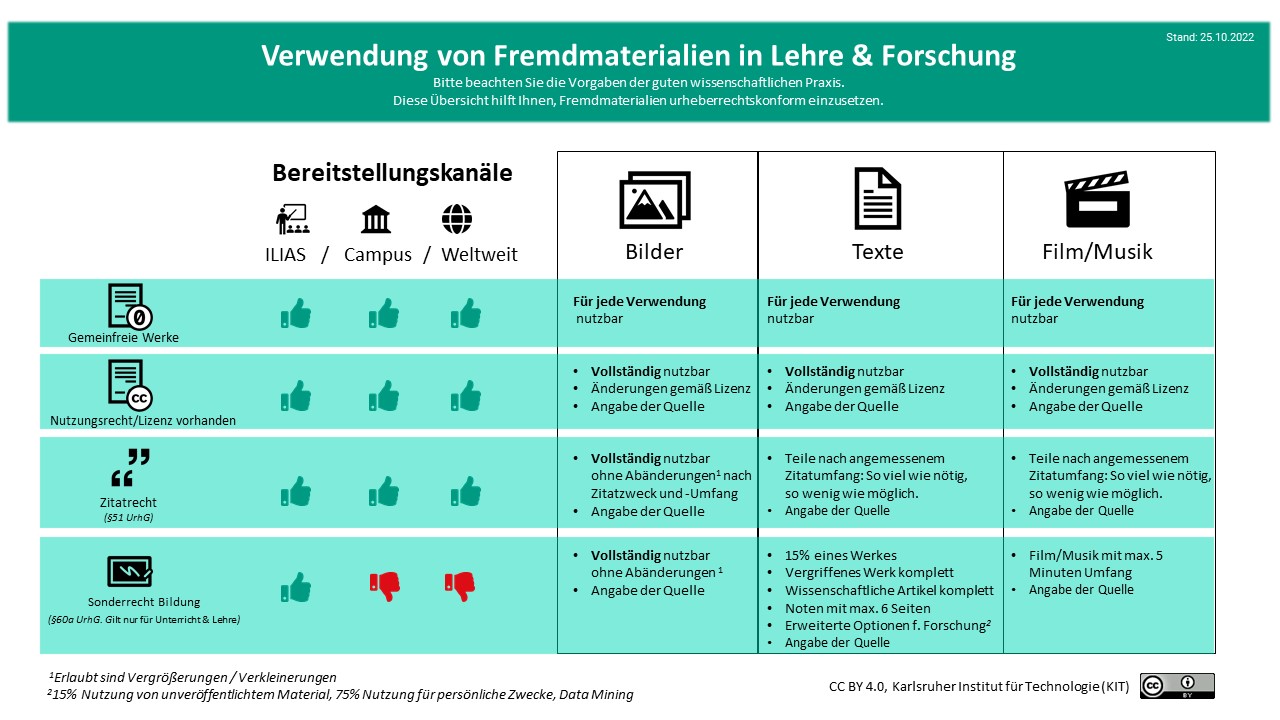
You may use materials protected under German copyright law (texts, graphics, images, illustrations, film clips, etc.) within the scope of the right to quote under Section 51 of the German Copyright Act (UrhG), provided that you comply with the conditions described there. Specifically, this means that the use of the protected material must be necessary to support your argument. You determine the interpretation yourself. If you are unsure, you can of course always ask the authors of the copyrighted material for permission to publish.
What requirements must be met for a quotation?
- There must be a substantive engagement with the quoted material. Images may not be used solely for illustrative purposes.
- The quoted material must already have been published.
- The length of the quotation must be appropriate: as much as necessary, as little as possible.
- The quotation must not be altered.
- The quoted material must be identified and accompanied by a source citation.
Yes. You may use materials protected under German copyright law (text, graphics, images, illustrations, film clips, etc.) within the scope of the right to quote under Section 51 of the UrhG, provided you comply with the conditions described there (see above)
This means that, in the case of images, you may use the entire image as a quotation, provided there is a contextual connection. For video and audio clips, you should use your own judgment to determine the appropriate excerpt needed to support your argument (as much as necessary, as little as possible). If you are unsure, you can of course always ask the copyright holders of the protected material for permission to publish.
You may reuse third-party materials for your teaching as long as you comply with the provisions of the Copyright Act. By correctly applying the right to quote (§51 UrhG), you have considerable freedom in designing your materials (see FAQ).
You have complete flexibility when reusing materials already published under a free license (e.g., a CC license) or materials that are in the public domain (e.g., with a CC0 license). You don’t even have to cite materials published under CC0. This helps you freely adapt your teaching materials. See the FAQ “What are free licenses / CC licenses?” and FAQ "What does 'public domain' mean?".
- Creative Commons search platform specifically for finding CC-licensed content:
https://wordpress.org/openverse/?referrer=creativecommons.org - Google search for content with a free license:
https://www.google.de/advanced_search
In Google’s advanced search, you can select the desired license under “Usage rights.” - Websites with collections of freely usable content:
- Databases: Images, Audio, Videos (Selection)
- https://pxhere.com (Public Domain Images)
- https://stocksnap.io/ (Public domain images)
- https://commons.wikimedia.org/wiki/Main_Page
Images, audio, and videos in the public domain or under a CC license). Wikimedia also provides a license notice generator that creates the appropriate license information for images and media from Wikimedia with the click of a button. - https://pixabay.com/de/
(Images, audio, videos, own license, comparable to CC0) - https://unsplash.com/license
(Images, own license, comparable to CC0) - https://www.pexels.com/de-de/creative-commons-images/
(Images, proprietary license, comparable to CC0)
- Databases: Music (selection)
- http://ccmixter.org/ (With CC license)
- https://audiohub.de/kostenlose-gemafreie-musik (CC-licensed)
- Databases: Icons (Selection)
- https://www.iconfinder.com
(Includes both paid and freely reusable icons)
- https://www.iconfinder.com
KIT does not have any binding guidelines on citation; there is only the Statutes for Safeguarding Good Research Practice. This is because the various citation styles generally depend on the respective academic communities.
Here are a few general guidelines: The citation should include the author’s name (first and last name) and the exact source (e.g., title of the book or journal, year of publication, page number, and, if applicable, the publisher).
For materials from the Internet, the URL must be provided in addition to the author’s name. In academic texts, the date of access is also often included.
If the material used was published under a Creative Commons license, the name of the license—with a link to the license text—is provided after the URL.
No, images that are quoted may not be altered. Resizing is not covered by this rule.
Yes, images may be used in a different size. So a small image from a textbook may certainly take up an entire slide as a citation.
There are no specific guidelines. Rule of thumb: As much as necessary, as little as possible.
It generally makes sense to make your materials available under a open license, because this allows you to determine not only the distribution channels but also the overall terms of reuse. These terms are then clearly visible to every user, indicating what they are permitted to do with the materials.
For distributing your teaching materials as Open Educational Resources, the internationally widespread and standardized licensing model from “Creative Commons” (CC license) is ideal. If you use this license, users will have more options when reusing your materials than those provided by the German Copyright Act (UrhG) (including use for personal purposes in accordance with Section 53 UrhG). You, as the author, will always be credited, and both you and your teaching materials will gain greater visibility. This is also in line with KIT’s overall mission.
With a free license, you expand the options for reuse: You retain the copyright, but you also grant additional rights for reuse. The free license allows others to immediately see how the document may be used, which can lead to faster dissemination. You, as the author, will always be credited.
Among the most widely used free licenses are the “Creative Commons” (CC) license models.
All Creative Commons licenses allow viewers and reusers of your materials a slightly broader scope of use than is permitted under copyright law. The CC BY and CC BY-SA licenses are particularly recommended, as they allow for adaptation and use for any purpose. They are therefore considered the only “true” free licenses in the open access community.
The NC (no commercial use) and ND (no modifications) conditions place greater restrictions on reuse and, strictly speaking, do not meet the definition of Open Educational Resources (OER), but they can still be used. Keep in mind that a prohibition on commercial use also means that an OER may not be used, for example, at private universities.
If you use third-party materials that have already been published under a Creative Commons license, the license for the entire video must not conflict with or further restrict the original license. However, it is always possible to exclude parts from the chosen license and label them accordingly. (“Unless otherwise noted, this work is licensed under …,” “with the exception of the XYZ graphics …”). The general rule is that you must specifically label any content that is not distributed under the same CC license. Otherwise, you run the risk of inadvertently licensing this content without permission—which would constitute a copyright infringement. You must indicate that the CC license applies only to your own content and not to the others.
Another alternative is to use third-party materials (typically images and graphics) not under the license you are using, but within the scope of the right to quote; see the examples in the following graphics.


A work is in the public domain if it is not subject to copyright. This is the case, for example, when the term of protection has expired (70 years after the author’s death). Official works (e.g., laws, regulations, government documents) are also in the public domain.
A work licensed under a CC0 license has been “released” into the public domain. This means that the authors have waived all copyrights and related rights to the extent permitted by law.